3. 云环境
应用程序通常需要环境特定的配置信息,尤其是在变化的环境(如亚马逊云环境)中。Spring Cloud AWS 提供了支持,以便在应用程序上下文中使用常见 Spring 机制(如属性占位符或 Spring 表达式语言)来检索和使用环境特定的数据。
3.1. 检索实例元数据
实例元数据 在 EC2 环境中可用。这些元数据可以通过一个特殊的 HTTP 地址进行查询,该地址提供实例元数据信息。Spring Cloud AWS 允许应用程序在表达式或属性占位符中直接访问这些元数据,而无需调用外部 HTTP 服务。
3.1.1. 使用 XML 启用实例元数据支持
实例元数据检索支持是通过类似 Spring 标准属性占位符的 XML 元素启用的。</p><p>以下代码示例演示了在应用程序上下文中激活实例元数据支持的方法。
<beans ...>
     <aws-context:context-instance-data />
</beans>|
实例元数据可以在无需授权的服务调用的情况下检索,因此上述配置不需要任何区域或安全相关的配置。 |
3.1.2. 使用 Java 启用实例元数据支持
实例元数据也可以在Java配置类中进行配置,而无需使用XML配置。下一个示例展示了一个典型的Spring @Configuration 类,该类通过 org.springframework.cloud.aws.context.config.annotation.EnableInstanceData 启用了实例元数据。
@Configuration
@EnableContextInstanceData
public static class ApplicationConfiguration {
}
3.1.3. 在 Spring Boot 中启用实例元数据支持
如果应用程序运行在 EC2 实例上,实例元数据会自动作为属性源提供给 Spring Boot 应用程序。
3.1.4. 使用实例元数据
实例元数据可以用于XML、Java占位符和表达式中。下面的示例演示了在XML文件中使用占位符使用实例元数据,以及引用特殊变量 environment 的表达式
<beans ...>
 <bean class="org.springframework.cloud.aws....SimpleConfigurationBean">
    <property name="value1" value="#{environment.ami-id}" />
    <property name="value2" value="#{environment.hostname}" />
    <property name="value3" value="${instance-type}" />
    <property name="value4" value="${instance-id}" />
 </bean>
</beans>使用Spring框架的org.springframework.beans.factory.annotation.Value注解可以直接注入实例元数据到Java字段。下一个例子展示了在Spring bean内部使用实例元数据。
@Component
public class ApplicationInfoBean {

    @Value("${ami-id:N/A}")
    private String amiId;

    @Value("${hostname:N/A}")
    private String hostname;

    @Value("${instance-type:N/A}")
    private String instanceType;

    @Value("${services/domain:N/A}")
    private String serviceDomain;
}|
每个实例元数据都可以通过在 实例元数据服务 中可用的密钥访问。 分隔属性可使用斜杠 ('/') 访问。 |
3.1.5. 使用实例用户数据
除了默认的实例元数据外,还可以为每个实例配置用户数据。这些用户数据由Spring Cloud AWS检索和解析。用户数据可以在启动应用程序的EC2实例时定义。Spring Cloud AWS期望在用户数据中包含格式<key>:<value>;<key>:<value>,以便它可以分析字符串并提取键值对。
用户数据可以使用下图中的管理控制台,或者使用CloudFormation模板\进行配置。
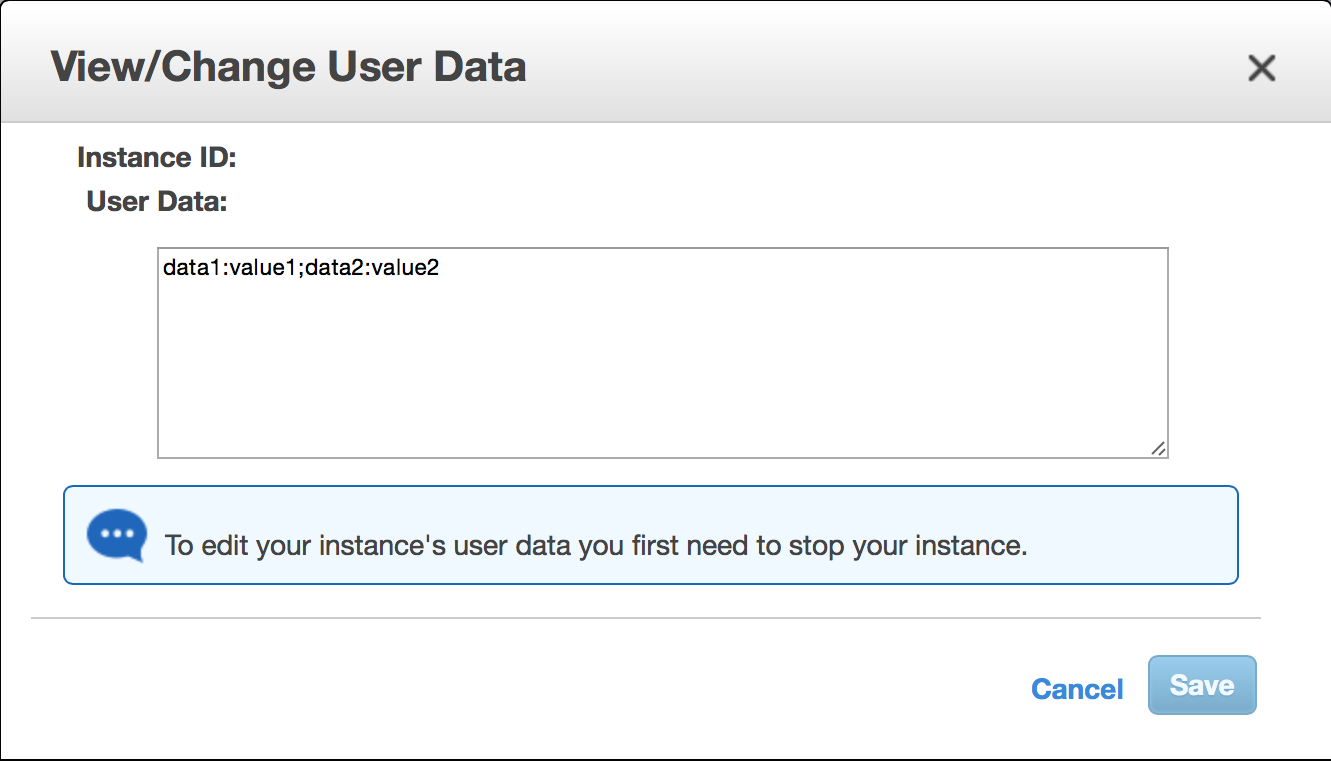
A CloudFormation 模板片段,用于配置用户数据的说明如下:
...
"Resources": {
 "ApplicationServerInstance": {
  "Type": "AWS::EC2::Instance",
  "Properties": {
   "ImageId": "ami-6a56b81d",
   "UserData": {
      "Fn::Base64": "data1:value1;data2:value2"
    },
   "InstanceType": "t1.micro",
  }
}
...
The user data can be accessed directly in the application context like the instance metadata through placeholders or expressions.
@Component
public class SecondConfigurationBean {

    @Value("${data1}")
    private String firstDataOption;

    @Value("${data2}")
    private String secondDataOption;
}
3.1.6. 使用实例标签
用户配置的属性也可以使用标签而不是用户数据进行配置。标签是 Amazon Web Services 上的全局概念,在不同的服务中使用。Spring Cloud AWS 在不同服务中也支持实例标签。与用户数据相比,用户标签可以在运行时更新,不需要停止和重新启动实例。
|
用户数据也可以在实例启动时用于执行脚本 因此,利用实例标签进行用户配置和用户数据在实例启动时执行脚本是很有用的。 |
实例特定的标签可以通过下面概述的管理控制台在实例级别进行配置,并 类似用户数据也可以通过后续展示的CloudFormation模板配置。
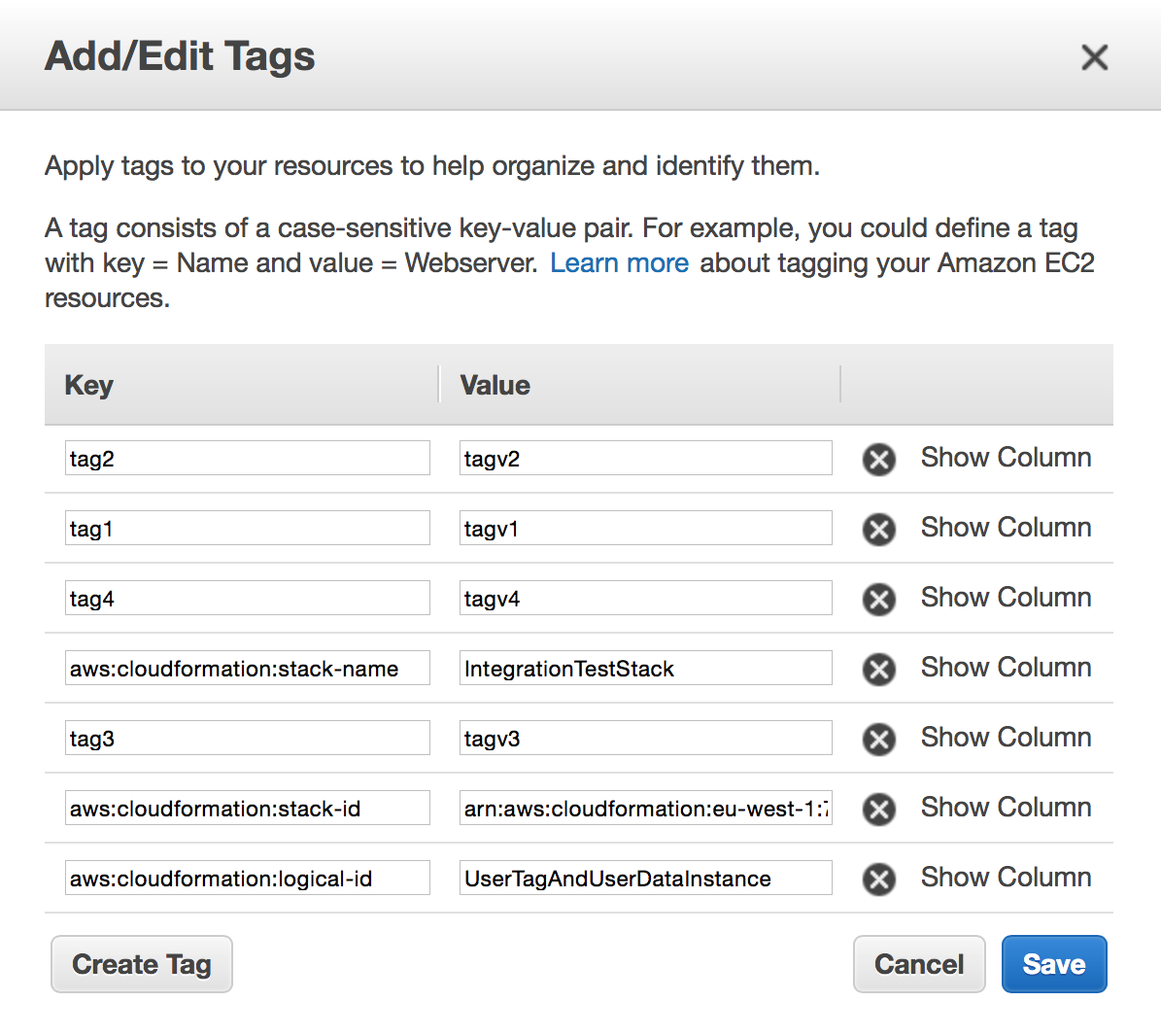
一个用于配置实例标签的CloudFormation模板片段如下所示:
...
"Resources": {
    "UserTagAndUserDataInstance": {
        "Type": "AWS::EC2::Instance",
        "Properties": {
            "ImageId": "ami-6a56b81d",
            "InstanceType": "t1.micro",
            "Tags": [
            {
                "Key": "tag1",
                "Value": "tagv1"
            },
            {
                "Key": "tag3",
                "Value": "tagv3"
            },
            {
                "Key": "tag2",
                "Value": "tagv2"
            },
            {
                "Key": "tag4",
                "Value": "tagv4"
            }
            ]
        }
    }
}
...
为了检索实例标签,Spring Cloud AWS 必须进行经过身份验证的请求,因此在实际解析占位符之前,它需要先配置区域和安全信息。另外,在启动应用程序上下文时,实例标签不可用,因此只能作为表达式引用,而不能使用占位符。context-instance-data元素定义了一个属性user-tags-map,该属性将在应用程序上下文中创建一个名为name的映射。然后可以使用表达式查询此映射以供其他bean定义使用。
<beans ...>
 <aws-context:context-instance-data user-tags-map="instanceData" />
</beans>
Java Bean 可能使用 @Value 注解解析表达式。
public class SimpleConfigurationBean {

   @Value("#{instanceData.tag1}")
   private String value1;

   @Value("#{instanceData.tag2}")
   private String value2;

   @Value("#{instanceData.tag3}")
   private String value3;

   @Value("#{instanceData.tag4}")
   private String value4;
}
3.1.7. 配置自定义EC2客户端
在某些情况下,需要使用自定义EC2客户端来检索实例信息。context-instance-data元素支持带有amazon-ec2属性的自定义EC2客户端。下一个示例显示了可能具有特殊配置的自定义EC2客户端的用法。
<beans ...>

  <aws-context:context-credentials>....</aws-context:context-credentials>
  <aws-context:context-region ... />
  <aws-context:context-instance-data  amazon-ec2="myCustomClient"/>

  <bean id="myCustomClient" class="com.amazonaws.services.ec2.AmazonEC2Client">
    ...
  </bean>
</beans>
3.1.8. 注入默认的EC2客户端
如果为实例数据配置了用户标记(参见上文),Spring Cloud AWS 将使用指定区域和安全凭据配置一个 EC2 客户端。应用程序开发人员可以使用 @Autowired 注解直接将其注入代码中。
public class ApplicationService {

    private final AmazonEC2 amazonEc2;

    @Autowired
    public ApplicationService(AmazonEC2 amazonEc2) {
        this.amazonEc2 = amazonEc2;
    }
}
3.2. 将您的 Spring Cloud 应用程序与 AWS 参数存储集成
Spring Cloud 提供了对集中式配置的支持,可以在应用程序启动时将其作为常规的 Spring PropertySource 进行读取和使用。参数存储配置允许您使用此机制与 AWS 参数存储。
只需添加对spring-cloud-starter-aws-parameter-store-configStarters模块的依赖即可激活支持。该支持类似于Spring Cloud Config Server或Consul键值存储提供的支持:可以定义跨所有服务或特定服务共享的配置参数,并且可以是特定于配置文件的。检索时将解密加密的值。
所有配置参数均从公共路径前缀中获取,该前缀默认为/config。共享参数从此处的默认路径application检索,而特定于服务的参数使用默认路径spring.application.name(由已配置的spring.application.name确定)。您可以使用点或正斜杠来指定配置键的名称。激活的配置文件名将使用默认下划线分隔符附加到路径。
这意味着对于名为 my-service 的服务,模块默认会找到并使用这些参数:
| 参数键 | 单桌Spring 属性 | 描述 |
|---|---|---|
|
|
由启用了配置支持的所有服务共享。可以使用特定于服务或配置文件的属性进行覆盖。 |
|
|
由启用了配置支持且激活了 |
|
|
特定于 |
|
|
当激活 |
注意,此模块不支持将完整的配置文件用作参数值,例如 Spring Cloud Consul 所做的那样: AWS 参数值被限制为 4096 个字符,因此我们只支持配置单个 Spring 属性。
您可以在 Spring Cloud bootstrap.properties 或 bootstrap.yml 文件中配置以下设置(请注意,应用了宽松属性绑定,因此不必使用此确切语法):
| 属性 | 默认 | 说明 |
|---|---|---|
|
|
表示从参数存储加载的每个属性的第一级前缀。 值必须以正斜杠开头,后跟一个或多个有效路径段,或者为空。 |
|
|
定义跨所有服务共享属性的上下文名称 |
|
|
连接附加配置文件与上下文名称的字符串。只能包含点、连字符、正斜杠、反斜杠和下划线,且这些符号必须紧邻字母数字字符。 |
|
|
指示在获取参数时出现错误是否应导致应用程序启动失败。 |
|
配置的值为 |
用于构造特定服务属性查找路径时使用的名称。 |
|
|
即使自动配置在类路径上,也可以使用它来禁用参数存储配置支持。 |
|
为了了解在应用启动时从 AWS 参数存储中检索哪些属性, |
3.3. 将您的 Spring Cloud 应用程序与 AWS Secrets Manager 集成
Spring Cloud 提供了对集中式配置的支持,可以在应用程序启动时将其读取并作为常规的 SpringPropertySource。Secrets Manager 配置允许您使用此机制与AWS Secrets Manager。
只需添加对spring-cloud-starter-aws-secrets-manager-config启动模块的依赖即可激活支持。这种支持类似于Spring Cloud Config Server或Consul键值存储提供的支持:可以定义配置参数在所有服务之间共享,也可以为特定服务设置,并且可以是针对不同环境的。
所有配置参数均从公共路径前缀中获取,该前缀默认为/secret。共享参数从此处的默认路径application检索,而特定于服务的参数使用默认路径spring.application.name(由已配置的spring.application.name确定)。您可以使用点或正斜杠来指定配置键的名称。激活的配置文件名将使用默认下划线分隔符附加到路径。
这意味着对于名为 my-service 的服务,模块默认会找到并使用这些参数:
| 参数键 | 描述 |
|---|---|
|
由启用了配置支持的所有服务共享。可以使用特定于服务或配置文件的属性进行覆盖。 |
|
由启用了配置支持且激活了 |
|
与 |
|
当激活 |
您可以在 Spring Cloud bootstrap.properties 或 bootstrap.yml 文件中配置以下设置(请注意,应用了宽松属性绑定,因此不必使用此确切语法):
| 属性 | 默认 | 说明 |
|---|---|---|
|
|
表示从 Secrets Manager 加载的每个属性的第一级前缀。值必须以斜杠开头,后跟一个或多个有效路径段,或者为空。 |
|
|
定义跨所有服务共享属性的上下文名称 |
|
|
连接附加配置文件与上下文名称的字符串。只能包含点、连字符、正斜杠、反斜杠和下划线,且这些符号必须紧邻字母数字字符。 |
|
|
表示在检索密钥时出现错误是否应该导致应用程序启动失败。 |
|
配置的值为 |
用于构造特定服务属性查找路径时使用的名称。 |
|
|
即使自动配置在类路径上,也可用于禁用密钥管理器配置支持。 |