7. 使用 JDBC 进行数据访问
Spring 对基于 JDBC 的数据访问技术提供了广泛的支持,例如 JdbcTemplate 和专门的 ORM(JPA、Hibernate)支持。Spring Cloud AWS 使应用程序开发者能够复用其选择的 JDBC 技术,并通过声明式配置访问 Amazon 关系型数据库服务。Spring Cloud AWS 为 JDBC 数据访问提供的主要支持包括:
-
基于 Amazon RDS 数据库实例的自动数据源配置和设置。
-
自动检测和配置 Amazon RDS 数据库实例的只读副本。
-
支持重试,以处理数据中心内多可用区故障转移期间发生的异常。
7.1. 配置数据源
在使用和配置数据库支持之前,应用程序必须将其相应的模块依赖项包含到其 Maven 配置中。Spring Cloud AWS JDBC 支持作为一个单独的模块提供,以允许模块化使用该模块。
7.1.1. Maven依赖配置
Spring Cloud AWS JDBC 模块作为一个独立模块提供,可以通过以下依赖声明进行导入。
<dependency>
    <groupId>org.springframework.cloud</groupId>
    <artifactId>spring-cloud-aws-jdbc</artifactId>
    <version>{spring-cloud-version}</version>
</dependency>
7.1.2. 基本数据源配置
The data source configuration requires the security and region configuration as a minimum allowing Spring Cloud AWS to retrieve
the database metadata information with the Amazon RDS service. Spring Cloud AWS provides an additional jdbc specific namespace
to configure the data source with the minimum attributes as shown in the example:
<beans xmlns:xsi="http://www.w3.org/2001/XMLSchema-instance"
       xmlns:jdbc="http://www.springframework.org/schema/cloud/aws/jdbc"
       xmlns="http://www.springframework.org/schema/beans"
       xsi:schemaLocation="http://www.springframework.org/schema/cloud/aws/jdbc
       http://www.springframework.org/schema/cloud/aws/jdbc/spring-cloud-aws-jdbc.xsd">

 <aws-context:context-credentials>
  ...
 </aws-context:context-credentials>

 <aws-context:context-region region="..."/>

<jdbc:data-source
         db-instance-identifier="myRdsDatabase"
         password="${rdsPassword}">
</jdbc:data-source>
</beans>配置参数的最小集是数据源的唯一id,指向有效的db-instance-identifier属性,该属性引用有效的Amazon RDS数据库实例。主用户密码。如果要使用另一个用户(建议这样做),则可以设置username属性。
有了这个配置,Spring Cloud AWS 获取所有必要的元数据,并使用默认属性创建一个 Tomcat JDBC 池。稍后可以将数据源注入任何 Spring Bean,如下所示:
@Service
public class SimpleDatabaseService implements DatabaseService {

 private final JdbcTemplate jdbcTemplate;

 @Autowired
 public SimpleDatabaseService(DataSource dataSource) {
    this.jdbcTemplate = new JdbcTemplate(dataSource);
 }
}可以使用带@Qualifier注解的dataSource注入点,允许在一个application context中存在多个dataSource配置,同时仍可使用自动装配。
7.1.3. 配置数据源池
Spring Cloud AWS 会使用默认属性创建一个新的 Tomcat JDBC 连接池。通常这些默认属性在连接池大小和其他设置方面并不符合应用程序的要求。数据源配置支持使用嵌套的 XML 元素配置所有有效的连接池属性。以下示例演示了如何使用自定义连接池属性重新配置数据源。
<beans ..>

 <aws-context:context-credentials>
  ...
 </aws-context:context-credentials>

 <aws-context:context-region region="..."/>

 <jdbc:data-source
         db-instance-identifier="myRdsDatabase"
         password="${rdsPassword}">
         <jdbc:pool-attributes initialSize="1" " maxActive="200" minIdle="10"
                testOnBorrow="true" validationQuery="SELECT 1" />
 </jdbc:data-source>

</beans>
一个包含所有配置属性及其值的完整列表可在此处获取。
7.2. 通过 Java 配置配置数据源
Spring Cloud AWS 还支持在@Configuration类中配置数据源。
org.springframework.cloud.aws.jdbc.config.annotation.EnableRdsInstance注解可用于配置一个数据源。多个注解可以用于配置多于一个数据源。每个注解将生成一个数据源 bean。
下面的类在一个配置类中展示了数据源配置
@Configuration
@EnableRdsInstance(dbInstanceIdentifier = "test",password = "secret", readReplicaSupport = true)
public class ApplicationConfiguration {
}
The configuration attributes are the same in the XML element. The required attributes are also the same for the XML configuration (the dbInstanceIdentifier and password attribute) |
7.2.1. 基于Java的数据源池配置
您还可以使用自定义值覆盖池配置。Spring Cloud AWS提供了一个org.springframework.cloud.aws.jdbc.config.annotation.RdsInstanceConfigurer,它创建了一个org.springframework.cloud.aws.jdbc.datasource.DataSourceFactory,其中可能包含自定义池属性。接下来的例子展示了实现一个配置器,该配置器会覆盖验证查询和初始大小。
@Configuration
@EnableRdsInstance(dbInstanceIdentifier = "test",password = "secret")
public class ApplicationConfiguration {

    @Bean
    public RdsInstanceConfigurer instanceConfigurer() {
        return new RdsInstanceConfigurer() {
            @Override
            public DataSourceFactory getDataSourceFactory() {
                TomcatJdbcDataSourceFactory dataSourceFactory = new TomcatJdbcDataSourceFactory();
                dataSourceFactory.setInitialSize(10);
                dataSourceFactory.setValidationQuery("SELECT 1 FROM DUAL");
                return dataSourceFactory;
            }
        };
    }
}
This class returns an anonymous class of type org.springframework.cloud.aws.jdbc.config.annotation.RdsInstanceConfigurer, which might also of course be a standalone class. |
7.3. 配置 Spring Boot 中的数据源
还可以使用SpringBoot配置文件配置数据源。由于一个应用程序内部的数据源数量动态变化,因此必须为每个数据源配置SpringBoot属性。
A data source configuration consists of the general property name cloud.aws.rds.<instanceName> for the data source identifier
following the sub properties for the particular data source where instanceName is the name of the concrete instance. The table below
outlines all properties for a data source using test as the instance identifier.
| 属性 | 例举 | 描述 |
|---|---|---|
cloud.aws.rds.test.password |
非常机密 |
数据库实例test的密码 |
cloud.aws.rds.test.username |
管理员 |
数据库实例 test 的用户名(可选) |
cloud.aws.rds.test.readReplicaSupport |
true |
如果应使用从属副本作为数据源(请参见下文) |
cloud.aws.rds.test.databaseName |
fooDb |
自定义数据库名,如果不想使用默认的RDS数据库名 |
<h3>7.4. 配置只读副本</h3>
Amazon RDS 可让使用 MySQL、MariaDB、Oracle、PostgreSQL 和 Microsoft SQL Server 的只读副本 实例来增加数据库的整体吞吐量,通过将只读数据访问卸载到一个或多个只读副本 从属服务器来实现,同时保持在主数据库中的数据。
Spring Cloud AWS支持与Spring只读事务结合使用只读副本。如果启用了只读副本支持,对只读事务将被路由到只读副本实例而使用主数据库进行写操作。
|
使用只读副本实例不保证对数据库访问强制执行严格的ACID语义,应谨慎使用。 这是因为只读副本可能落后于主,并且写入可能不会立即对只读事务可见。 因此,建议仅在事务中使用只读副本,这些事务读取很少更改的数据,并且应用程序可以处理过时的数据。 |
读副本支持可以通过在数据源配置中使用read-replica属性来启用。
<beans ..>
 <jdbc:data-source db-instance-identifier="RdsSingleMicroInstance"
    password="${rdsPassword}" read-replica-support="true">

 </jdbc:data-source>
</beans>
Spring Cloud AWS 将搜索为主数据库创建的所有只读副本,并将只读事务路由到可用的只读副本之一。如示例所示,可以实现使用只读副本的业务服务。
@Service
public class SimpleDatabaseService {

    private final JdbcTemplate jdbcTemplate;

    @Autowired
    public SimpleDatabaseService(DataSource dataSource) {
        this.jdbcTemplate = new JdbcTemplate(dataSource);
    }

    @Transactional(readOnly = true)
    public Person loadAll() {
        // read data on the read replica
    }

    @Transactional
    public void updatePerson(Person person) {
        // write data into database
    }
}
7.5. Failover support
Amazon RDS 支持多可用区故障转移,如果由于停机或主实例出现故障而导致一个可用区不可用。此复制是同步的(与只读副本相反),并提供连续服务。Spring Cloud AWS 在多可用区故障转移期间支持重试机制,以恢复失败的事务。
|
在大多数情况下,最好直接向用户反馈,而不是尝试可能很长且频繁的重试,这会在用户交互中产生影响。因此,故障转移支持主要适用于批处理应用程序或对服务调用响应性不重要的应用程序。 |
Spring Cloud AWS JDBC模块提供了一个重试拦截器,可用于装饰服务以使用拦截器。</p><p>如果因为多可用区故障切换导致临时错误,该拦截器将重新执行数据库操作。多可用区故障切换通常仅持续几秒钟,因此很可能成功重试业务事务。
拦截器可以配置为常规 bean,然后使用切入点表达式来装饰对相应方法调用的修饰。 拦截器必须有一个配置好的数据库,可以从 Amazon RDS 服务中检索当前状态(如果是临时故障转移或永久性错误)。
拦截器的配置可以通过Spring Cloud AWS jdbc命名空间中的自定义元素进行,如图所示进行配置:
<beans ..>
    <jdbc:retry-interceptor id="myInterceptor"
        db-instance-identifier="myRdsDatabase"
        max-number-of-retries="10" />
</beans>
拦截器本身可用于与任何Spring建议配置一起使用,以包装相应的服务。可以定义一个切入点,如下所示,用于本章中显示的服务:
<beans ..>
 <aop:config>
  <aop:advisor advice-ref="myInterceptor" pointcut="bean(simpleDatabaseService)" order="1" />
 </aop:config>
</beans>|
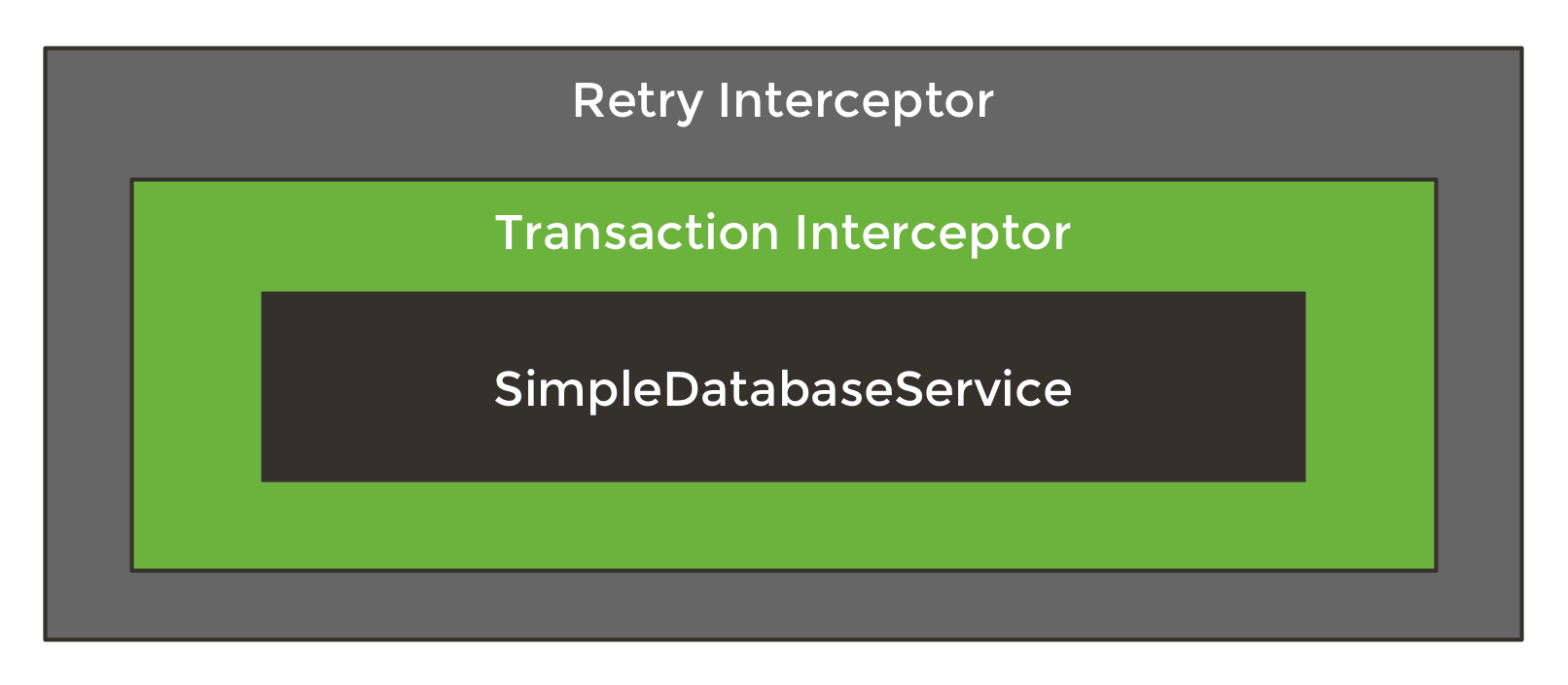
确保拦截器在事务拦截器外部调用,以确保整个事务将被重新执行。如果在事务拦截器内部配置拦截器,将会导致永久错误,因为损坏的连接永远不会被刷新。 |
<p>上面的配置结合事务配置会产生以下服务的代理配置。</p>
7.6. CloudFormation support
Spring Cloud AWS支持使用CloudFormation进行配置的数据库实例。Spring Cloud AWS可以在数据库配置中使用逻辑名称,并用生成的资源名称查找具体的数据库。在CloudFormation中,可以轻松地配置数据库,其模板定义可能看起来像下面的示例。
"myRdsDatabase": {
    "Type": "AWS::RDS::DBInstance",
    "Properties": {
     "AllocatedStorage": "5",
     "DBInstanceClass": "db.t1.micro",
     "DBName": "test",
     "Engine": "mysql",
     "MasterUsername": "admin",
     "MasterUserPassword": {"Ref":"RdsPassword"},
     ...
    }
 },
 "readReplicaDatabase": {
    "Type": "AWS::RDS::DBInstance",
    "Properties": {
     "AllocatedStorage" : "5",
     "SourceDBInstanceIdentifier": {
        "Ref": "myRdsDatabase"
     },
     "DBInstanceClass": "db.t1.micro"
    }
 }
}
然后,数据库可以使用模板中设置的名称进行配置。另外,还可以启用只读副本,以便在应用程序中使用配置的只读副本数据库。下面列出了使用配置数据库的配置:
<beans>
 <aws-context:stack-configuration/>

 <jdbc:data-source db-instance-identifier="myRdsDatabase" password="${rdsPassword}" read-replica-support="true"/>
</beans>
7.7. 数据库标记
Amazon RDS 实例也可以使用特定于 RDS 的数据库标记进行配置,允许用户在数据库中配置数据库特定的配置元数据。可以使用 user-tags-map 属性在 data-source 元素上配置特定于数据库实例的标记。如下例所示,配置标记支持:
<jdbc:data-source
    db-instance-identifier="myRdsDatabase"
    password="${rdsPassword}" user-tags-map="dbTags" />
那允许开发人员在代码中使用下例中的表达式来访问属性,如下面的类所示:
public class SampleService {

    @Value("#{dbTags['aws:cloudformation:aws:cloudformation:stack-name']}")
    private String stackName;
}|
标记数据库 代码 0 是使用 CloudFormation 配置数据库时创建的默认标记。 |